related blog
%20(3).svg)
10
Real-Time Task Updates for Construction Teams
Real-time, GPS-verified photo updates eliminate rework and delays by giving construction teams instant, auditable field visibility.

Real-time updates are transforming how construction teams work by reducing delays, errors, and unnecessary costs. Here’s why they matter:
- Outdated methods (paper logs and phone calls) often lead to delays, miscommunication, and rework. For example, a foreman might report progress hours late, disrupting schedules and causing costly mistakes.
- General digital tools (emails and messaging apps) improve speed but still create confusion with scattered data, version conflicts, and manual effort to organize updates.
- Specialized platforms like CrewCam solve these issues with GPS-verified, time-stamped photos that sync instantly to the cloud, providing accurate, real-time insights. These tools reduce rework, save time, and offer reliable records for disputes or audits.
Quick Comparison
| Method | Pros | Cons |
|---|---|---|
| Manual (Paper) | Low cost, easy to use | Delayed updates, errors, no visual records, hard to track or audit |
| Digital Tools | Faster than paper, more organized | Scattered data, version conflicts, no GPS/timestamps, manual organization |
| CrewCam | Real-time updates, GPS/time-stamped photos, automated organization | Initial cost, requires training and consistent use |
Manual and general digital tools both fall short in speed, accuracy, and reliability. Platforms like CrewCam offer a modern solution to improve communication and reduce the $88 billion lost annually in rework due to poor data.
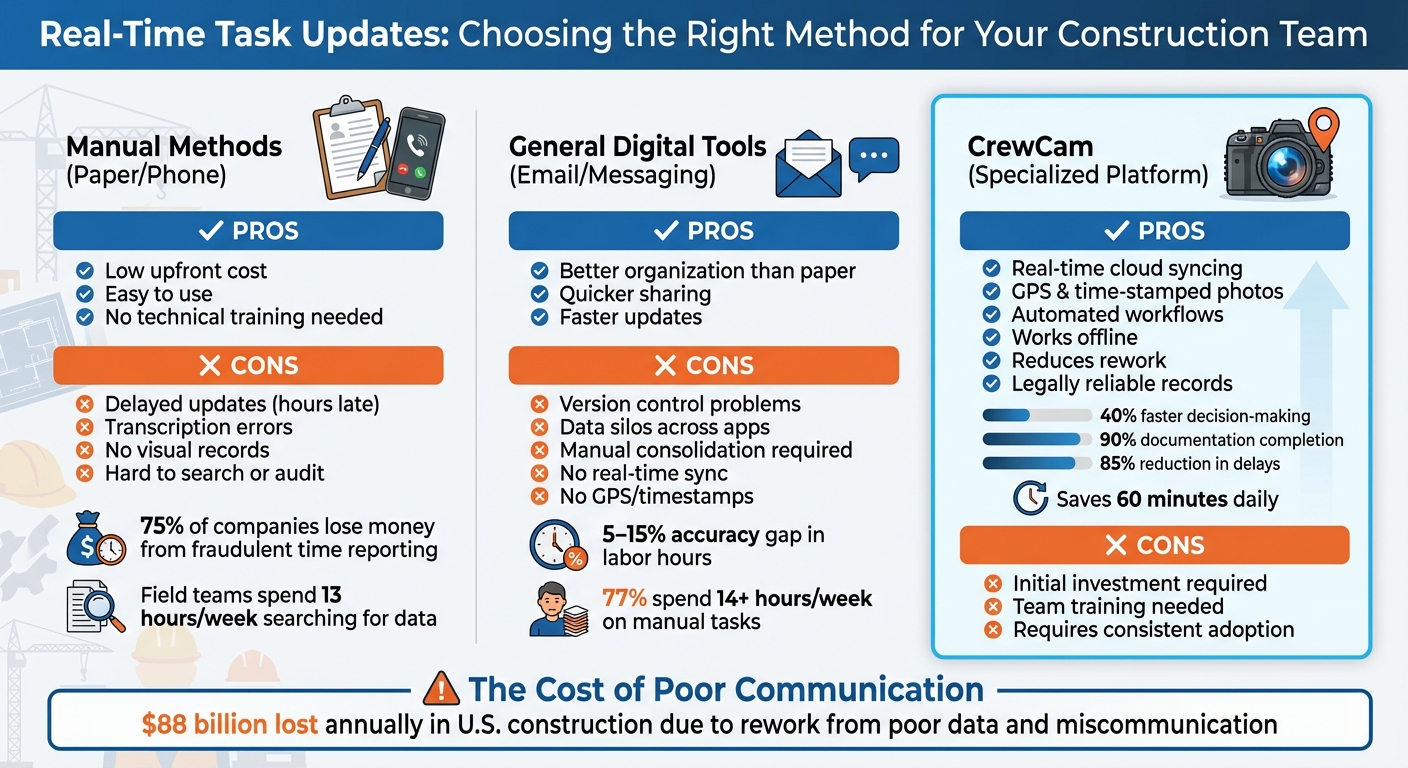
Construction Task Update Methods Comparison: Manual vs Digital vs CrewCam
How Is Real-Time Tracking Used In Construction? - How It Comes Together
sbb-itb-5f4c686
1. Manual Methods (Paper Logs, Phone Calls)
Relying on paper logs and phone calls for tracking progress might feel familiar, but it often leads to delays and inefficiencies that can cost both time and money. Picture a foreman walking the site with a clipboard, jotting down notes, and calling the office at the end of the day - or even the next morning. This approach, while traditional, struggles to keep up with the fast-paced demands of modern construction.
Update Speed
One of the biggest hurdles with manual methods is the delay in communication. Information from the field often reaches the office hours after events unfold, leaving managers to make decisions based on outdated data. Field supervisors may spend hours each shift gathering updates from multiple sources and compiling them into a single report. This lag disrupts efforts to maintain accurate, real-time information, making it harder for teams to adapt to changes on-site. Additionally, relying on phone calls or texts can result in conflicting updates between architects, subcontractors, and superintendents.
Field Accessibility
Paper logs come with their own set of challenges. They’re vulnerable to weather damage, can easily be misplaced amidst the hustle of a construction site, and are difficult to reference later. Office staff often face the time-consuming task of digging through binders or scrolling through old emails to verify details. In fact, field teams can spend up to 13 hours a week searching for scattered project data, draining productivity and slowing down progress.
Error Reduction
Manual reporting is also prone to human error. Handwritten notes can be misread, misinterpreted, or even lost in translation when being transcribed. For example, a vague note like "ceiling grid complete" might leave questions about quality or materials, leading to follow-up calls and further delays. Joel Anzelc, Vice President at ASI General Contractors, shared a costly example:
"We discovered there were two sets of plans after one week of work".
This oversight caused his crew to follow outdated plans for an entire week, resulting in expensive rework.
Cost Implications
The financial impact of manual methods goes beyond wasted time. Imagine a scenario where a concrete pour finishes at 2:00 PM, but the office doesn’t learn about it until the next morning. Subcontractors could show up to an unprepared site, leading to wasted mobilization costs and delays. Devin Morris, Project Manager at T&G Constructors, highlighted how manual documentation once consumed 8 hours of his week just for reviewing subcontractor invoices. After switching to digital tools, that time dropped to just 1 hour per week.
As companies grow, the inefficiencies of paper-based systems become even more apparent. Managing larger volumes of data often requires hiring additional administrative staff. On top of that, teams using standard phone features for documentation can lose up to 9 hours weekly compared to those using purpose-built solutions. These examples underscore the need for faster, more reliable ways to manage project information.
2. General Digital Tools (Email, Messaging Apps)
Switching from paper to email and messaging apps might feel like progress, but these tools come with their own set of challenges. While they’re undoubtedly faster than waiting for a phone call or shuffling through physical files, they often lead to disorganized text threads and endless email chains. Someone still has to go through the chaos to piece everything together. Tamara Melkonyan, an author at Buildern, summed it up well:
"By the end of the day, three versions of the same update exist, and none of them match".
Update Speed
Sure, emails and messaging apps deliver updates faster than paper logs, but they don’t eliminate delays entirely. Field supervisors often spend hours after their shifts consolidating scattered notes into a coherent report. These tools may speed up communication, but they still rely on manual effort to organize the information into something actionable. In fact, 77% of construction professionals spend over 14 hours each week on tasks like manually assembling schedules and updates.
Field Accessibility
Most field workers carry smartphones these days, but accessibility issues persist. Photos and updates often end up stuck in personal device galleries or scattered across various apps. When a project manager needs to confirm a detail from two weeks ago, they’re left digging through fragmented threads and overloaded inboxes. This disorganization eats up time - field teams lose an average of 13 hours per week just searching for project data spread across emails and unorganized folders. That’s more than a full workday wasted on "data hunts." This lack of streamlined access doesn’t just slow down work; it increases the risk of errors.
Error Reduction
Fragmented access leads to another issue: version chaos. Unlike paper logs, which are prone to human error, digital tools can create confusion with conflicting versions of updates or instructions. Without a centralized system, teams often end up working with outdated drawings or contradictory messages buried in email threads. For instance, a simple text message saying "ceiling grid complete" leaves too much room for interpretation - was the work done to spec? What materials were used? These gaps often result in follow-up calls or, worse, costly rework. Manual or supervisor-led reporting through emails and texts contributes to a 5% to 15% accuracy gap in recorded labor hours.
Cost Implications
Disorganized communication doesn’t just waste time - it hits the budget hard. Miscommunication is a major driver of rework costs. Picture this: a weather delay gets mentioned in a text thread, but the subcontractor scheduled for the next day never sees it. They arrive at an unprepared site, and you’re stuck footing the bill for mobilization costs. Even photos shared through these tools often lack metadata, making them less useful for documentation or dispute resolution. These gaps in communication can quickly add up, draining both time and money.
3. CrewCam

CrewCam steps in to tackle the inefficiencies of manual and standard digital methods by using visual documentation to improve update speed, accessibility, accuracy, and cost management.
At its core, CrewCam emphasizes visual documentation. Instead of relying on text-based updates that can often lead to miscommunication, it uses GPS- and time-stamped photos to create a clear, objective record of site conditions. With delays and communication breakdowns being common pain points, CrewCam provides a streamlined, image-first solution. Field supervisors capture photos that automatically sync to the cloud, complete with metadata, giving office teams real-time insights and bridging the communication gap between the field and the office.
Update Speed
CrewCam's cloud syncing ensures that images are instantly available, offering managers real-time visibility into project progress. Unlike traditional email chains or text messages that require manual organization, CrewCam automates the process, saving valuable time. Managers can quickly compare live photos to project schedules, turning progress discussions into data-driven conversations rather than subjective debates.
Field Accessibility
For jobsites in remote areas with limited internet access, CrewCam includes an offline mode. Field crews can capture GPS-tagged photos even without connectivity, and the app syncs them automatically once back online. With unlimited cloud storage, teams can access complete project histories from anywhere, eliminating the hassle of searching through scattered files.
Error Reduction
CrewCam's markup tools allow crews to annotate photos, adding clarity that plain text updates simply can't match. This added visual context reduces the need for follow-up calls and minimizes the risk of outdated information causing errors. Role-based access controls ensure that only authorized personnel can modify critical documentation, preserving data accuracy. Additionally, standardized capture angles and checklists ensure consistent documentation across all jobsites.
Cost Implications
Communication breakdowns and poor data cost U.S. construction companies over $88 billion annually in rework expenses. CrewCam addresses this by providing timestamped, geotagged photos that help teams identify and resolve issues before they escalate into expensive delays. With unlimited storage and automated organization, teams spend less time on administrative tasks and more time on actual construction work, maximizing efficiency and cutting unnecessary costs.
Advantages and Disadvantages
Every method comes with its own set of trade-offs, impacting timelines, budgets, and overall coordination - factors that are crucial for making informed decisions.
Manual methods, such as paper logs and phone calls, are inexpensive and easy to use since most people are already familiar with them. However, they come with significant drawbacks. For instance, decisions are often made based on outdated information due to delayed updates. According to the American Payroll Association, around 75% of companies experience financial losses from "buddy punching" - a form of fraudulent time reporting that's much easier to pull off with manual logs. Additionally, transcription errors are common when handwritten notes are later entered into office systems. Without visual records, subjective notes can also lead to misinterpretation.
Digital tools like email and messaging provide faster, more organized communication compared to manual methods. However, they still fall short when it comes to version control. For example, a superintendent might confirm a delivery via text, while an architect emails updated instructions - leading to conflicting information by the end of the day. Field teams often lose hours trying to consolidate scattered data. Furthermore, these tools typically lack features like automatic GPS verification and timestamping, which can result in missing context and raise doubts about data authenticity.
CrewCam, on the other hand, simplifies documentation and reduces errors by offering features like instant cloud syncing, GPS-verified photos, and automated organization. Its visual-first approach eliminates the need for subjective descriptions, and it even works offline, allowing field crews to document progress in remote areas. Role-based controls and tamper-proof metadata ensure the records are legally reliable. The main challenge is the upfront investment in hardware, software, and team training, but the long-term savings can far exceed these initial costs.
Here’s a quick breakdown of the pros and cons for each method:
| Method | Key Advantages | Key Disadvantages |
|---|---|---|
| Manual (Paper/Phone) | Low upfront cost; easy to use; no technical training needed. | Delayed updates; prone to transcription errors; lacks visual evidence; hard to search or audit. |
| General Digital (Email/Messaging) | Better organization than paper; quicker sharing; faster updates. | Version control problems; data silos; manual data consolidation required; no real-time sync or verified metadata. |
| CrewCam | Real-time updates; automated workflows; GPS/time-stamped photos; reduces rework; works offline; legally reliable records. | Requires initial investment in hardware/software; team adoption and consistent usage needed. |
Conclusion
Real-time task updates are reshaping how modern construction sites operate, tackling inefficiencies that have long plagued the industry. In the U.S. alone, builders lost over $88 billion in a single year due to rework caused by poor data and unclear communication. Moving from outdated manual logs to advanced tools like CrewCam offers construction teams a chance to achieve unmatched accuracy and efficiency.
These losses highlight the need for a centralized, modern solution. Tools like CrewCam directly address these challenges by consolidating photos, notes, and updates into one tamper-proof system with GPS and timestamps. For office managers, this means real-time insights into jobsite conditions, speeding up decision-making by 40%. With a 90% documentation completion rate and an 85% reduction in delays, projects save up to 60 minutes daily.
By standardizing jobsite photo documentation and integrating it with scheduling and billing systems, teams can reduce rework and improve accountability. Regular audits of these tools ensure they remain effective and aligned with project goals.
The construction industry simply can't afford the massive costs of communication breakdowns. Turning casual photos into organized, actionable data while creating legally defensible records transforms operations. Tools like CrewCam not only streamline daily workflows but also safeguard your business. The real question isn't whether to upgrade from manual processes - it's how quickly you can adopt a solution that meets the demands of today's jobsite. With specialized visual documentation, project management becomes smoother, more accountable, and far more efficient.
FAQs
What counts as a “real-time” task update on a jobsite?
Real-time task updates on a jobsite mean sharing information about current conditions, progress, or challenges almost instantly through digital tools. This often involves uploading geotagged and timestamped photos, videos, or notes to a cloud-based platform. These updates give stakeholders access to accurate, up-to-date visuals, enabling quicker decisions, problem-solving, and adjustments based on reliable information shared across the team.
How do GPS- and time-stamped photos help prevent rework?
GPS- and time-stamped photos serve as precise, reliable documentation of jobsite conditions and progress. By offering clear, verifiable records, they help identify potential problems early, prevent miscommunications, and reduce conflicts. This ensures work is done right from the start.
How can field crews capture updates when there’s no internet?
Field crews can stay productive even without internet access by using offline-capable tools like construction documentation mobile apps. These apps let teams capture GPS and time-stamped photos, add annotations, and manage tasks offline. Once they're back online, the data syncs automatically to the cloud, ensuring it integrates smoothly with project workflows and keeps everyone informed without interruptions.
Related Blog Posts


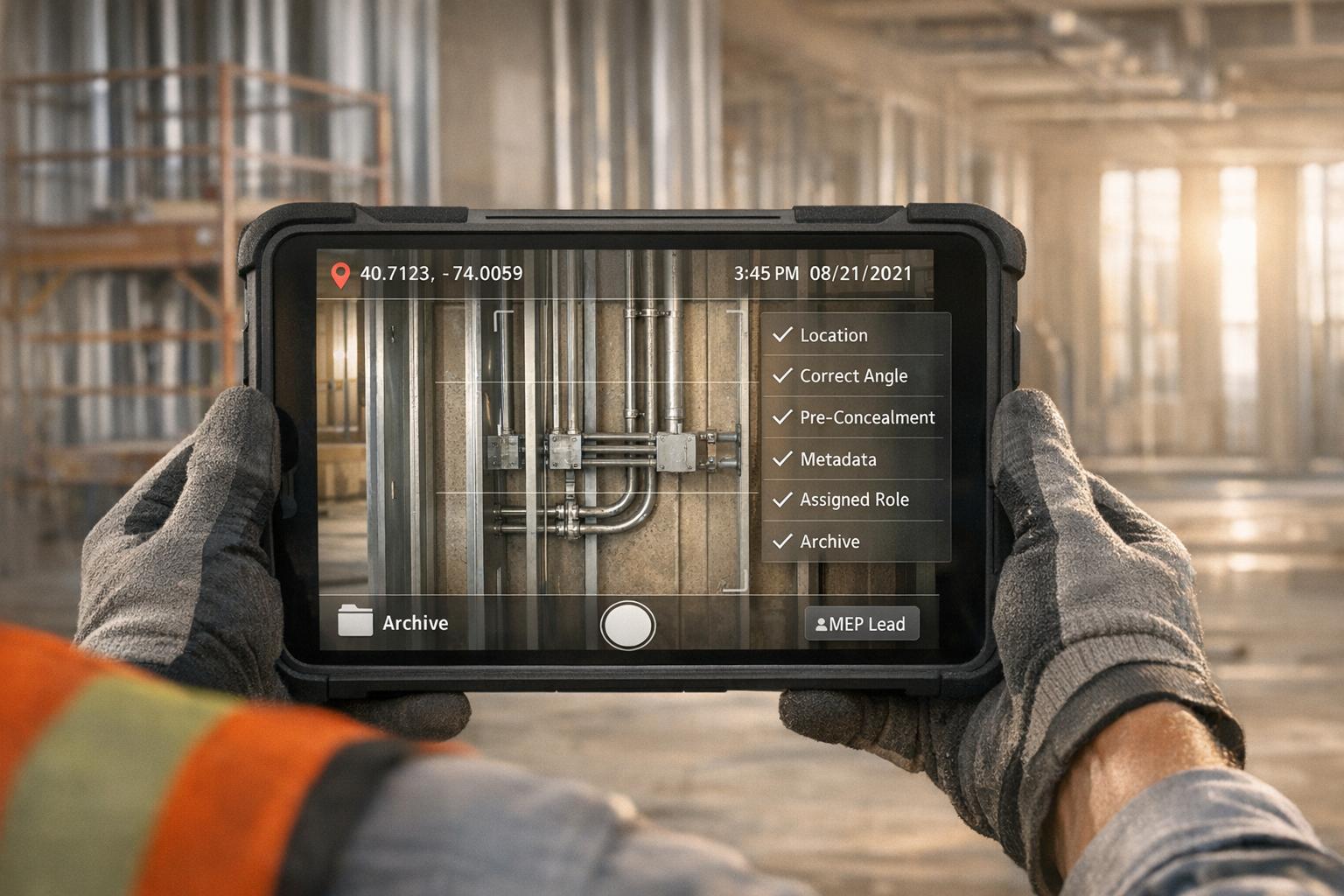
See CrewCam in action
Start your free trial now by clicking the button below


Wanna chat or demo?
Questions? Concerns? Requests? Talk to a real human

Watch a CrewCam demo now 😎
Short on time, busy, got jobs to do? See how CrewCam works now!