related blog
%20(3).svg)
12
Cloud vs. Local Storage for Jobsite Photos
Compare cloud and local storage for jobsite photos—access, security, cost, scalability, and when to use each. Includes offline and collaboration guidance.
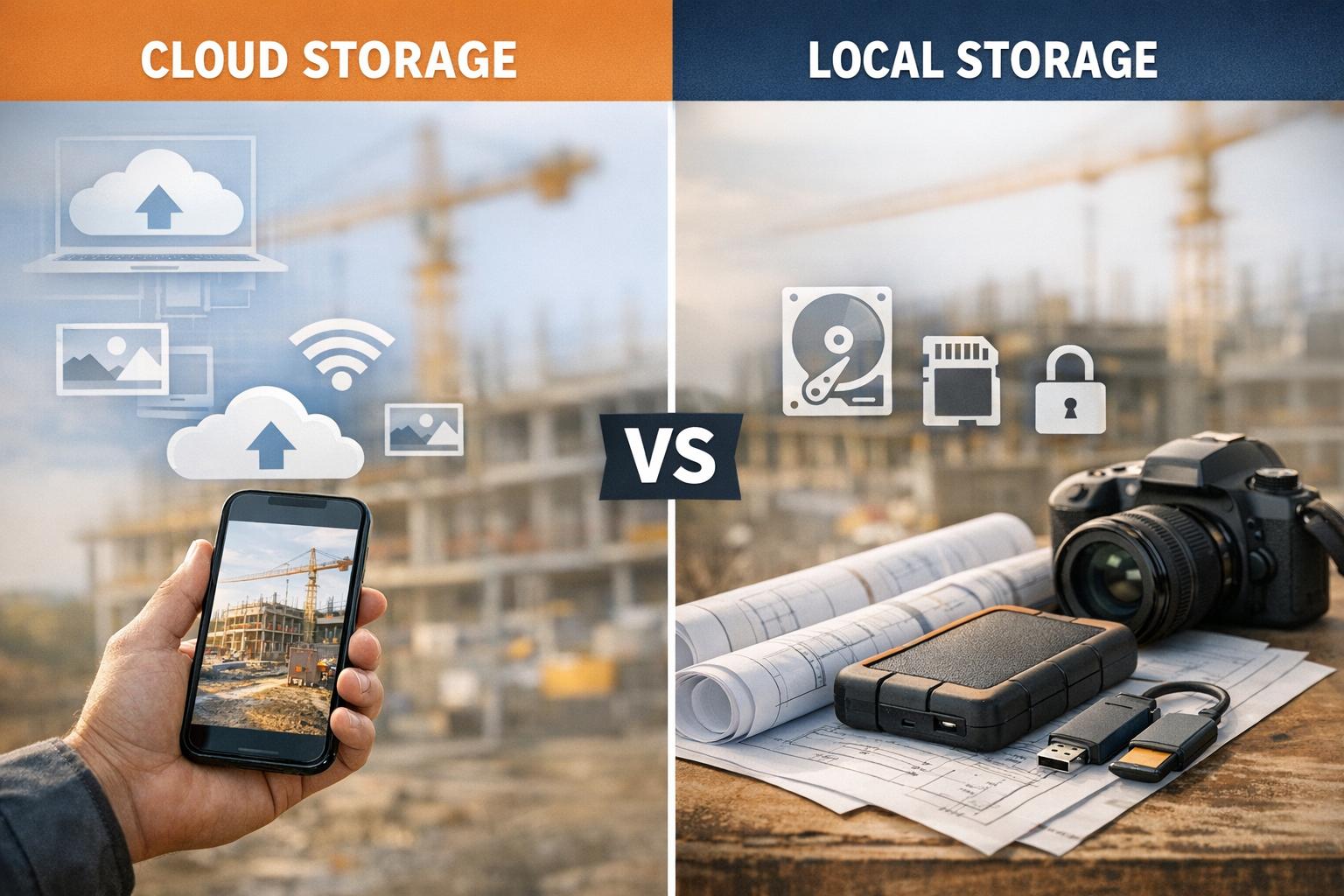
Cloud and local storage both play critical roles in managing construction photo documentation. Choosing the right option depends on your needs for accessibility, security, scalability, and cost.
- Cloud storage: Ideal for real-time collaboration, automatic backups, and easy scalability. Specialized tools like CrewCam allow teams to organize job photos seamlessly in the cloud. It works best when internet access is reliable. Monthly fees range from $6.99 to $15.99, but it eliminates risks like theft or damage to physical devices.
- Local storage: Offers offline reliability and complete control over data. It’s a one-time investment but comes with risks like physical damage and limited scalability. Devices often need replacing every five years.
Quick Comparison
| Factor | Cloud Storage | Local Storage |
|---|---|---|
| Accessibility | Anywhere with internet | Offline, physical access required |
| Cost | Low upfront, ongoing subscription | High upfront, no recurring fees |
| Scalability | Expandable with subscription | Limited by hardware capacity |
| Security | Protected from physical risks | Vulnerable to theft or disasters |
| Speed | Internet-dependent | Instant, no network delays |
For most teams, cloud storage offers better flexibility and protection, especially for large-scale projects with high collaboration needs. Local storage remains a solid choice for offline environments or projects requiring tight data control.
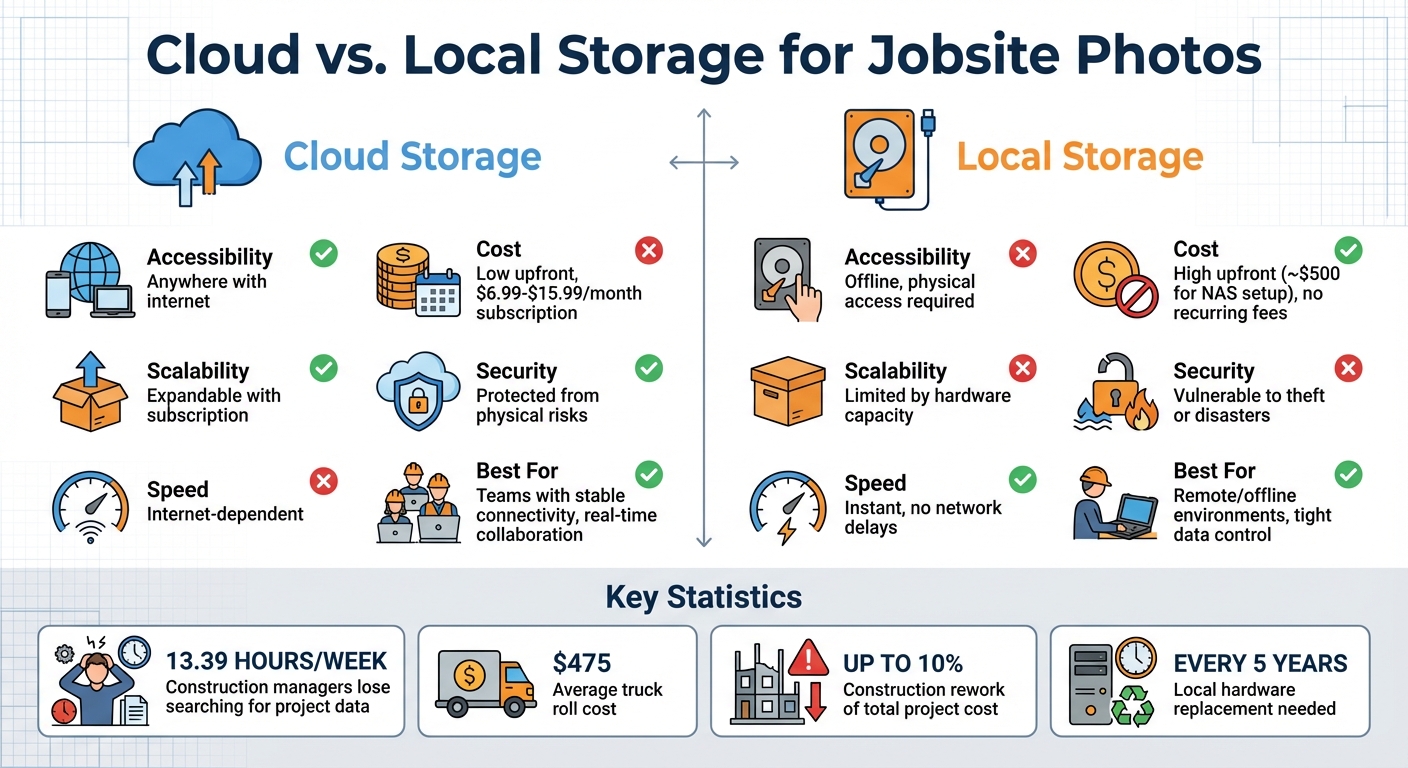
Cloud vs Local Storage Comparison for Jobsite Photos
Cloud Storage vs. Local Storage: What’s the Difference?
Local Storage: Pros and Cons
Local storage involves keeping jobsite photos and data directly on physical devices like SD cards, external hard drives, or NVRs. This method ensures your data stays onsite and under your direct control. Let’s break down what makes local storage appealing and where it falls short.
Benefits of Local Storage
One of the biggest advantages of local storage is offline accessibility - your data doesn't depend on an internet connection to be accessed or stored. Once you've purchased the necessary hardware, there are no recurring monthly fees, making it a one-time investment.
Storage capacity is another plus. A typical local hard drive offers anywhere from 500GB to 2TB of space, which is enough to store thousands of high-resolution photos. For continuous recording needs, NVRs equipped with built-in hard drives often outperform standard SD cards in terms of reliability and capacity.
Drawbacks of Local Storage
Despite its benefits, local storage has its vulnerabilities. Physical risks like theft, damage, or natural disasters (fires, floods) can result in permanent data loss. As Reolink explains:
Disasters like fires or floods can destroy hard drives and, if you do not have any off-site backups, your data will be lost.
Scalability is another hurdle. When a device, such as a 32GB SD card or a 2TB hard drive, runs out of space, you'll need to either invest in additional hardware or delete files. Expanding your storage isn’t an instant process. Reolink also points out:
The more data you have, the more physical storage you need, so the upfront investment can potentially be a barrier.
Moreover, local storage devices typically need replacing every five years, adding to long-term costs.
Sharing files stored locally can also be cumbersome. It often requires physically transporting devices or using USB drives, which can lead to delays. This process may also result in extra expenses, with truck roll costs averaging $475.
Next, we’ll explore how cloud storage compares as an alternative.
Cloud Storage: Pros and Cons
Cloud storage allows you to store jobsite photos on secure, remotely managed servers. While it offers a range of advantages, there are some trade-offs to consider.
Benefits of Cloud Storage
Flexible storage capacity: One of the biggest perks of cloud storage is that it grows with you. Unlike fixed local storage - like a 32GB SD card or a 2TB hard drive - you can expand your storage simply by upgrading your subscription plan. No need for hardware upgrades as your photo library expands.
Access from anywhere: Authorized users can easily access jobsite photos from any device with an internet connection, whether they’re in the office, at home, or even on-site. Cameron Shouppe, Owner of Reliant Roofing, highlights this advantage:
It's a fantastic and completely necessary tool for our company, especially with the amount of projects we do. We love that the images are uploaded in real time.
Automatic backups: Cloud systems take care of backing up your images automatically, complete with details like date, time, and GPS tags. This ensures your data is secure and well-documented. Considering that construction managers lose an average of 13.39 hours each week searching for project data, this feature can be a game changer.
Improved team collaboration: A centralized cloud platform allows team members to upload, view, and comment on photos in real time. This minimizes miscommunication and ensures everyone stays on the same page. Plus, real-time uploads let managers confirm site surveys are complete before crews leave, helping to avoid costly return trips - like the $475 average cost of a truck roll in the solar industry.
Drawbacks of Cloud Storage
Internet reliance: A stable internet connection is essential for accessing, uploading, or viewing photos. This can be a challenge on remote job sites with limited connectivity or during network outages.
Ongoing subscription fees: Unlike local storage, which typically involves a one-time purchase, cloud services come with recurring costs. These fees can increase over time. For instance, basic camera storage plans range from $6.99 to $15.99 per month.
Privacy concerns: Storing sensitive data with a third-party provider introduces potential security risks. As Reolink points out:
The possibility of data getting breached is always there. Even your providers could access your data without authorization.
Most cloud services use a shared responsibility model, meaning you’ll need to implement additional security measures on your end.
Heavy bandwidth usage: Uploading and downloading high-resolution photos and videos can eat up a lot of bandwidth, potentially slowing down other operations on-site. Some services may also compress images to save space, which can compromise quality when detailed documentation is required.
Cloud vs. Local Storage: Side-by-Side Comparison
Let’s break it down: cloud storage offers anywhere access, while local storage provides offline reliability. Both have their strengths and trade-offs, especially when it comes to jobsite documentation.
Cloud storage shines with its ability to work seamlessly across devices like phones, tablets, and laptops, making it perfect for on-the-go access. On the other hand, local storage operates entirely offline, which is a lifesaver for remote jobsites or areas with unreliable networks. However, accessing local storage remotely often requires additional technical configurations.
When it comes to cost, the two options follow very different paths. Cloud storage typically has low upfront costs but involves ongoing subscription fees - think around $10 per month for a 2 TB plan. Local storage, however, demands a higher initial investment. For example, a basic NAS setup with drives can cost about $500, but it may pay for itself in under five years. Keep in mind, though, that local hardware often needs replacing every five years or so.
Performance is another key factor. Local storage offers fast, direct access to high-resolution files without the delays caused by network issues. Meanwhile, cloud storage performance depends entirely on your internet connection. For instance, Google Drive has a daily upload cap of 750 GB, which could slow things down for large-scale projects.
Here’s a quick side-by-side comparison to help you weigh your options:
Comparison Table
| Factor | Cloud Storage | Local Storage |
|---|---|---|
| Accessibility | Access from anywhere with internet | Works offline; limited to physical device or network |
| Speed | Bandwidth-dependent; slower for large files | High-speed direct access; no network delays |
| Upfront Cost | Low (subscription-based) | High (hardware and setup costs) |
| Recurring Cost | $6.99–$15.99/month for basic plans | Variable (electricity, maintenance) |
| Scalability | Easily expandable as needed | Limited by hardware; requires new drives for growth |
| Backup Reliability | Automated, redundant across data centers | Manual; often requires RAID or secondary backups |
| Security | Encrypted; protected from physical theft | Vulnerable to physical theft, fire, or hardware failure |
| Site Suitability | Great for teams with stable connectivity | Best for remote or offline environments |
Each option has its place, depending on your specific needs - whether it’s the convenience of cloud storage or the reliability of local solutions, the choice ultimately comes down to your priorities.
sbb-itb-5f4c686
When to Use Each Storage Type
Deciding between storage options often comes down to factors like connectivity, budget, and how much collaboration your project requires. Let’s break down when each method is the better fit.
When to Use Local Storage
Local storage is the go-to choice for areas where internet access is unreliable or for projects aiming to avoid ongoing costs. Think about remote jobsites, like construction projects in areas without established infrastructure, vacation homes in rural locations, or places with poor cellular coverage. In these scenarios, having a storage option that works offline is crucial. Devices equipped with microSD slots or recording hubs can store essential data even when the network is down.
Although the initial cost of SD cards, hard drives, or network video recorders may seem high, these one-time purchases save you from paying monthly subscription fees. This makes local storage particularly appealing for smaller contractors managing a few projects at a time, where the upfront investment quickly offsets itself.
Another key advantage of local storage is physical data control. For projects requiring on-site data due to privacy or compliance concerns, keeping files on physical devices ensures you know exactly who has access. This level of control is often critical for high-security or sensitive projects.
That said, some situations call for the flexibility and advanced features of cloud storage.
When to Use Cloud Storage
Cloud storage stands out when you have consistent internet access and need seamless collaboration or scalable data management. For instance, office managers can confirm that site surveys are complete before field crews leave, avoiding costly return trips.
For long-term projects, especially those tied to liability protection, cloud storage offers automated tools that keep everything organized and verifiable. Consider this: construction rework can account for up to 10% of a project’s total cost, and disputes over construction expenses averaged $85.7 million globally in 2025. Cloud platforms simplify this by tagging photos with GPS data and timestamps, creating reliable "before-and-after" records that can stand up in legal situations.
Cloud storage also excels in projects where real-time collaboration is essential. If architects, engineers, or clients need immediate updates on site conditions, cloud platforms enable instant access for everyone involved. This eliminates the chaos of scattered photos across devices, email chains, or personal drives, ensuring that everyone stays on the same page.
Why Cloud Storage Works Best for Most Jobsite Photos
Cloud storage tackles common challenges like remote access, easy scalability, and reliable disaster recovery - making it a game-changer for managing jobsite photos. With cloud solutions, project managers can monitor site conditions from anywhere, while field crews document progress in real time. This eliminates the hassle of retrieving physical storage devices and keeps workflows smooth.
As projects grow, cloud storage adapts effortlessly. Need more space? Just upgrade your subscription - no extra hardware required. This is especially handy when managing multiple active jobsites that generate tons of photos.
Another big win: cloud storage protects your data from onsite risks like theft, water damage, or fire. Unlike local storage devices, which are vulnerable to these threats, remote servers keep your documentation safe and sound.
Collaboration also gets a boost. When everyone works from a single, centralized system, communication becomes seamless. Cameron Shouppe, Owner of Reliant Roofing, shares:
It's a fantastic and completely necessary tool for our company, especially with the amount of projects we do. We love that the images are uploaded in real time.
This instant syncing allows office staff to review completed work before crews leave the site, cutting down on unnecessary return trips and keeping projects on track.
These features make cloud-based solutions like CrewCam a perfect fit for modern jobsite documentation.
CrewCam: Cloud Storage Built for Jobsite Photos

CrewCam offers unlimited cloud storage designed specifically for jobsite photos. Each photo and video is automatically tagged with GPS coordinates and timestamps, creating verifiable records that hold up in legal situations. Even better, the platform’s offline mode ensures field crews can capture documentation without cellular service - photos sync automatically once they’re back online.
The real-time project feed keeps everyone in the loop. Field technicians upload photos that instantly appear for project managers, clients, and other stakeholders. Mike Pavelka from Mapco Exteriors explains how this boosts efficiency:
The platform allows teams to document jobs through the entire process and access photos in real time to increase productivity.
CrewCam also includes on-photo annotations, so team members can add drawings, text, or notes directly on images. This helps avoid misunderstandings about what needs attention.
To keep things organized, CrewCam uses project-based workflows with checklists. Assign team members to specific projects, share photo galleries via link, and maintain complete visibility - all without the chaos of misplaced files. Starting at $39 per month for up to two team members, CrewCam also offers desktop access and HD photo capture, scaling alongside your business as it grows.
Conclusion
Both cloud and local storage have their place, but for most teams, cloud storage delivers more practical advantages. Local storage still has its uses, particularly in offline settings or when working with massive RAW image files that require quick editing speeds.
Inefficient documentation and data management can cost teams dearly. For instance, construction managers lose about 13.39 hours each week just searching for project details. Add to that the expenses tied to disputes and rework, and the financial impact becomes clear. Cloud storage, with real-time syncing, eliminates these headaches by making photos instantly accessible as soon as they’re taken.
What’s needed is a storage solution that’s efficient, reliable, and tailored to the jobsite. CrewCam offers unlimited cloud storage built specifically for jobsite photos. It automatically tags images with GPS coordinates and timestamps, and even works offline, so you can document everything without worrying about connectivity. Plus, the real-time project feed ensures everyone stays on the same page across all projects.
Starting at just $39 per month for up to two team members, CrewCam simplifies jobsite documentation with features like on-photo annotations, project-based checklists, and sharable galleries. Say goodbye to the risk of losing critical evidence to a failed hard drive or running out of storage space. CrewCam keeps your documentation safe, organized, and accessible when you need it most.
FAQs
What’s the best way to store jobsite photos: cloud or local storage?
Choosing between cloud and local storage for jobsite photos often comes down to three key factors: accessibility, security, and cost.
Cloud storage is a great option if you need your team to upload, view, and organize photos in real time from any device. This makes it especially handy for collaboration. Plus, it offers automated backups and disaster recovery, which helps safeguard important documentation. The catch? You’ll need a stable internet connection, which can be tricky to maintain in remote areas.
On the other hand, local storage gives you complete control over your data and doesn’t depend on internet access. While it does require an upfront investment in hardware and ongoing maintenance, it’s often the better choice for locations with strict data policies or unreliable connectivity.
Pro Tip: Many contractors find that a mix of both works best. For instance, they might rely on local storage in remote areas and use cloud solutions like CrewCam for centralized access and unlimited storage once a reliable connection is available.
What are the key security risks of using cloud storage for jobsite photos?
When relying on cloud storage, the biggest security concerns typically revolve around unauthorized access, data breaches, and the risk of data loss if the provider's servers are compromised. While cloud providers do put robust security measures in place, businesses also play a key role in keeping their data safe. This includes managing access permissions carefully and ensuring passwords are strong and secure.
To reduce these risks, opt for a reliable service that emphasizes security. Look for features like encrypted storage and tools for managing user access - these can help keep your jobsite photos secure and well-organized.
Is local storage suitable for managing large-scale jobsite photo documentation?
Local storage can hit its limits pretty quickly when it comes to managing large-scale jobsite photo documentation. Its capacity is often restricted, turning it into a bottleneck for growing projects. Upgrading hardware to accommodate more data isn't just costly - it’s also a time sink. On top of that, local storage falls short when it comes to flexibility. Sharing and updating files in real-time becomes a challenge, making team collaboration less efficient.
For projects that demand easy access, room to grow, and dependable backups, cloud storage offers a more practical and efficient alternative.
Related Blog Posts



See CrewCam in action
Start your free trial now by clicking the button below


Wanna chat or demo?
Questions? Concerns? Requests? Talk to a real human

Watch a CrewCam demo now 😎
Short on time, busy, got jobs to do? See how CrewCam works now!