related blog
%20(3).svg)
15
Best Practices for Sharing Jobsite Photos
Capture, organize, and securely share jobsite photos with standardized shooting protocols, timestamps, tagging, and curated galleries to save time and reduce disputes.

Disorganized jobsite photos waste time, create disputes, and hurt accountability. Teams can lose over 9 hours weekly searching for scattered documentation. Proper photo management saves time, reduces disputes by 85%, and improves project tracking.
Here’s what you need to know:
- Clear Goals: Define the purpose (progress tracking, inspections, client updates, or risk management) to guide what and when to photograph.
- Consistency: Standardize angles, timing, and framing for reliable documentation.
- Organized Galleries: Use logical folders and tags (e.g., Project > Phase > Date) to cut search time by 82%.
- Secure Sharing: Limit access based on roles and share curated galleries for clients or inspectors.
- Use Tools Like CrewCam: Automate date, time, and GPS stamps, add annotations, and improve collaboration with real-time updates.
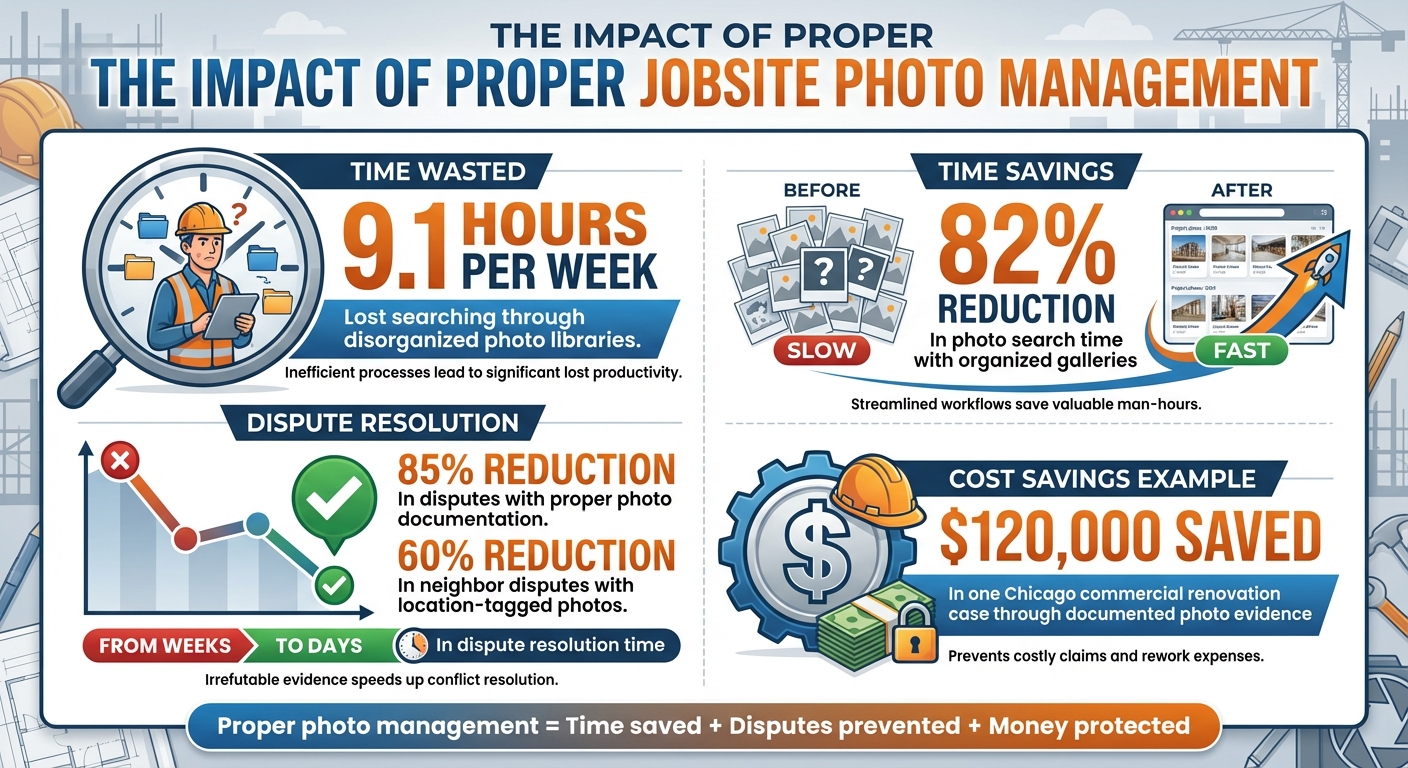
Jobsite Photo Management: Key Statistics and Time Savings
The Basics: Take Better Photos & Keep Them Organized
Planning Your Jobsite Photo Sharing Strategy
Before snapping any photos, it’s essential to have a clear plan in place. Start by identifying your purpose for documenting the jobsite. Common reasons include tracking progress, conducting quality and safety inspections, updating clients and stakeholders, creating marketing and portfolio material, or managing risks and disputes. Each of these goals will influence what you photograph and when. For instance, if your focus is on progress tracking, you’ll want to establish consistent shooting times and angles so changes over time are easy to compare. On the other hand, if risk management is your priority, you’ll need to document key activities and hidden systems with time- and GPS-stamped photos to meet legal requirements. Once your goals are clear, you can build a photo sharing strategy that aligns with these objectives.
Set Clear Goals for Photo Sharing
Knowing your core objectives is key. Are you capturing photos for progress updates to keep owners and contractors informed? Are you creating inspection records for quality control and safety compliance? Or perhaps you’re focused on building a marketing portfolio or protecting your business from potential disputes? Each purpose requires a different approach. Progress photos often involve wide-angle shots taken from consistent reference points, while quality control demands close-ups that highlight specific connections or finishes. For client communication, clean, milestone-focused images that tell a clear story - without revealing sensitive internal details - are most effective. When your objectives are well-defined, your team will know exactly what to capture and who needs to see it.
Create Standard Photo Capture Protocols
Consistency is the backbone of effective photo documentation. Standardize elements like camera angles, framing, and timing for various scenarios. For example, require a mix of wide, medium, and close-up shots to provide overall context, detailed assemblies, and specific features. You can also establish specific patterns for coverage, such as photographing in a clockwise direction or from fixed positions, to ensure uniformity. Tools like CrewCam can help enforce these standards by guiding team members with predefined project checklists, ensuring that photos are consistent regardless of who takes them. Training your crews on these protocols will further reduce variation and make your documentation more reliable.
Develop Photo Documentation Checklists
A good checklist ensures nothing gets overlooked. Break your project into phases - preconstruction, active work, and closeout - and create a list of required photo categories for each stage. During preconstruction, document existing site conditions, adjacent properties, utilities, and any pre-existing damage. For active work, focus on foundations, concealed systems before they’re covered, structural framing, and overall progress. At closeout, capture finishes, resolved punch list items, and final conditions. Embedding these checklists into tools like CrewCam makes field execution seamless, allowing crews to work through tasks directly on their phones instead of relying on memory. With project-based checklists and photo tasks, CrewCam helps streamline structured, phase-specific documentation on the jobsite.
How to Capture High-Quality Jobsite Photos
Once you've outlined your photo protocols, the next step is ensuring the images you take are clear, consistent, and informative. High-quality jobsite photos are essential for tracking progress, maintaining quality control, and resolving disputes. By mastering a few simple techniques, even mobile devices can capture images that serve as powerful documentation tools. When field teams follow these principles, every photo becomes a reliable record that adds value to the project.
Maintain Image Clarity and Consistency
Getting sharp, well-composed photos doesn’t require expensive equipment - just attention to detail. Start by holding your phone steady, bracing your elbows on a stable surface if needed, and ensuring the auto-focus is locked before snapping the shot. Avoid using digital zoom, as it reduces image quality. Instead, physically move closer to your subject for detailed shots and take wider shots to provide context. These steps ensure anyone reviewing the photo can clearly understand the location and details of what’s being documented.
Lighting plays a big role in image quality, so adjust your position to reduce glare or graininess. For consistency, agree on a standard orientation - landscape is typically best - and establish set angles or shooting points for progress photos. This makes it easier to compare images taken on different days or by different team members. Don’t forget to clean your camera lens regularly and use the highest resolution setting your device supports. This way, your photos will stay sharp even when viewed on larger screens or zoomed in for detail.
Add Date, Time, and GPS Stamps
Including date, time, and location metadata in your photos can save time and prevent future headaches. These stamps create a reliable record that shows exactly when and where a photo was taken, which is critical for verifying work progress and resolving disputes. For example, location-tagged photos can confirm that safety measures, utility installations, or nearby structures were documented at specific times. This level of detail can reduce neighbor disputes by up to 60% and cut dispute resolution times from weeks to just days.
Tools like CrewCam make this process effortless by automatically embedding date, time, and GPS data into every photo or video. With these features, users don’t have to worry about manually adjusting device settings - it’s all handled for them. Plus, because the images are stored in the cloud by project, teams can quickly search or filter photos by capture date, location, or user. This makes it easy to reconstruct events and demonstrate what happened, when, and where.
Add Annotations and Notes to Photos
Annotations turn a simple photo into a detailed communication tool. Use arrows, circles, or labels to highlight specific issues like cracks, missing components, or incorrect materials. For longer explanations, add text notes or comments alongside the image. With CrewCam, these features are built right in, allowing users to mark up photos directly and include notes about the required fixes. For instance, you can highlight a misaligned fixture and explain the correction needed - all within the same image.
These annotated photos are shared instantly in a live project feed, so everyone from subcontractors to office staff sees the same marked-up image in real time. This eliminates the need for secondhand descriptions and reduces the risk of miscommunication. Since the annotations, notes, and comments are stored with the original, time-stamped image, project managers can later review flagged issues, track when they were identified, and confirm how they were addressed. This process not only enhances accountability but also provides valuable insights for future projects. Combined with the project checklists you set up earlier, this ensures that no detail is overlooked.
Organizing and Structuring Photo Galleries
One of the biggest hurdles in managing jobsite photos is making sure your team can find what they need without wasting time. Did you know that construction teams lose about 9.1 hours per week searching through messy photo libraries? A well-organized gallery with consistent naming and tagging can slash this time by 82%. The trick is to set up a system that mirrors your workflow, making navigation simple and intuitive. This approach naturally ties in with the photo capture techniques we discussed earlier.
Build Logical Folder Structures
A solid folder structure is the backbone of an organized gallery. The best systems use a consistent, hierarchical naming format that reflects how teams typically work. Here's a tried-and-true structure: Project > Phase/Building > Floor/Zone > Trade/Activity > Date (MM-DD-YYYY). For example, you might have: MainStreetOfficeTower > Phase1 > 3rdFloor > ElectricalRoughIn > 03-15-2025. This setup makes it easy to locate specific areas or tasks quickly and efficiently.
To keep things running smoothly:
- Keep folder names under 25 characters.
- Use underscores or hyphens instead of spaces to ensure compatibility across platforms.
- Standardize trade names like "Mechanical", "Plumbing", or "Punch List" so everyone knows where to look.
- Stick to a consistent date format (MM-DD-YYYY) to avoid confusion, especially across multiple projects.
This method aligns perfectly with tools like CrewCam, which emphasize project-based organization. By syncing your folder structure with your team’s workflow, you create a system that supports seamless documentation and easy access.
Apply Tags and Filters for Quick Access
Folders are just the start - tags take your organization to the next level. With tags, your photo gallery becomes a powerful, searchable database. Keywords like "Inspection", "Daily Progress", "Safety Hazard", "RFI", "Change Order", or "Concrete Pour" make it easy to locate exactly what you need. For example, filtering by "Punch List" and "Electrical" on a specific floor allows a superintendent to focus on relevant items during a walkthrough without sifting through unrelated photos.
To make this work:
- Use a limited, consistent set of tags.
- Train your team to apply tags uniformly.
- Stick to a controlled vocabulary so searches are fast and reliable.
CrewCam’s tagging feature simplifies this process by letting you label photos instantly. You can then search by date, location, trade, or even photographer, saving valuable time when retrieving jobsite information.
Separate Internal and External Galleries
For a fully streamlined workflow, consider creating separate galleries for internal use and external sharing. An internal gallery should include everything - daily documentation, issues, rework, or safety concerns. Meanwhile, an external gallery can showcase key milestones, such as "Weekly Progress – Main Street Office Tower – Week of 04-07-2025".
CrewCam makes this easy by allowing you to set access permissions. You can invite team members to view internal galleries while securely sharing curated collections with external stakeholders. This way, clients get a polished, professional view of the project, while your internal records remain intact and under your control.
sbb-itb-5f4c686
Sharing Jobsite Photos Securely
After organizing your photo galleries, the next step is sharing them securely. In U.S. construction, uncontrolled access to jobsite photos can pose serious risks. Sensitive details like project specifics, utility locations, or safety concerns could lead to legal claims or financial losses. For instance, during a commercial renovation in Chicago, time-stamped and location-tagged photos helped resolve a flooring dispute, saving $120,000 by proving documented conditions. The key to avoiding such risks lies in controlling who can view your photos, when, and how. Start by setting clear role-based access permissions.
Set Role-Based Access Permissions
Control access by assigning permissions based on roles. For example, field crews might upload and view photos related to their tasks, project managers could access all internal documentation, and clients would only see curated progress galleries. Subcontractors should be limited to photos relevant to their specific scope, protecting the confidentiality of other project details.
CrewCam makes this process straightforward by enabling role-based permissions. Clients can have view-only access, while managers retain editing rights. This ensures the integrity of your visual records while reducing the risk of misuse or liability.
Use Real-Time Updates and Offline Functionality
Real-time updates are invaluable for keeping everyone aligned. A live project feed allows offices, owners, and remote stakeholders to monitor progress without constant site visits, minimizing miscommunication and rework. However, many U.S. construction sites - especially in rural or large-scale industrial areas - struggle with poor connectivity. That’s where offline functionality becomes crucial.
Offline capture lets crews document work, annotate photos, and complete checklists locally. Once connectivity is restored, all data syncs securely, ensuring nothing is lost. For example, crews can document hazards or progress offline and upload the information later. This approach maintains a continuous, auditable record while ensuring only finalized, curated content is shared externally.
Share Curated Galleries with External Stakeholders
When sharing updates with clients, inspectors, or regulators, it’s critical to provide curated galleries that focus on relevant progress. Highlight key milestones, completed tasks, or punch list items while removing sensitive information like utility markings or structural specifics. Add clear captions or annotations for context, and organize galleries by phase, area, or date (e.g., "Weekly Progress – Main Street Office Tower – Week of 04/07/2025").
Updates can be shared on a weekly schedule or at major project milestones. For example, inspectors might need updates before and after foundation pours, framing, or MEP rough-ins. Additionally, ad-hoc updates can address unexpected events, such as safety incidents, scope changes, or weather delays. If a storm disrupts work, a targeted gallery with time-stamped photos of site conditions can help support a delay claim.
CrewCam enhances this process by offering secure, password-protected gallery sharing. You can configure view-only, time-limited, or role-based access, ensuring external stakeholders see a polished, professional view of the project. Temporary collaborators like consultants or inspectors can also be granted limited access to specific projects, ensuring they only see what’s necessary. This balance of security and accessibility keeps your internal records protected while maintaining transparency with external parties.
Using CrewCam for Jobsite Photo Documentation

CrewCam takes jobsite photo documentation to the next level by combining all the essential steps - capturing, organizing, and sharing - into one streamlined platform. Instead of juggling manual uploads or scattered files across devices, CrewCam centralizes everything. Every photo is automatically tagged with project details, time, and location, syncing seamlessly to the cloud. This means field teams and office staff can access the same real-time visual records, cutting down the hours wasted searching through disorganized photo libraries. In fact, pairing CrewCam with consistent tagging and structured project organization can reduce photo retrieval time by over 80%.
Capture and Organize Photos with CrewCam
Start each shift by using CrewCam’s built-in camera. Every photo you take is automatically stamped with the date, time, and GPS location, ensuring accuracy. Follow your planned route - whether it's framing on level 2 or inspecting the MEP rough-in zone - and capture clear, focused images that show both the big picture and the finer details. Don’t forget to document adjacent properties, utilities, or hidden elements before they’re covered up. If you encounter conditions like standing water or frozen ground that might impact the schedule, these automatically timestamped photos can serve as solid evidence during disputes.
Once your photos are captured, keep them organized by creating a project for each job. This keeps all visual documentation in one searchable location. Use consistent tags like "preconstruction", "inspection", "roof", or "safety" to make retrieval easier. For example, a project manager can quickly filter for "MEP rough-in – November" photos on a specific floor instead of sifting through thousands of images. You can also create separate tag sets or saved filters for internal documentation versus stakeholder updates. Since CrewCam syncs everything to the cloud, there’s no need for manual file transfers - photos are instantly accessible to project managers and executives for decision-making.
Share Galleries and Collaborate in Real-Time
CrewCam simplifies collaboration by letting you create shareable photo galleries from selected images. This way, you don’t have to expose your entire internal library, which might include sensitive notes or trade coordination details. Generate secure links to project galleries that owners, inspectors, or remote executives can easily access through a browser. You can also provide guest collaborator access, allowing external stakeholders to comment or ask questions directly on specific images, avoiding lengthy email threads or generic file-sharing methods.
The platform’s live project feed updates in real-time, displaying every new photo, video, annotation, or checklist entry in a chronological timeline. This ensures that when a field worker captures an issue - like a conflict between ductwork and structural elements - project engineers and managers can address it the same day, rather than waiting for it to surface in a weekly report. With centralized access and mobile or desktop logins, CrewCam bridges the gap between field teams, office staff, and external partners, enabling seamless collaboration.
Link Photos to Tasks and Checklists
CrewCam also allows you to link photo documentation directly to project tasks, reinforcing consistency and reducing risks. You can create project-specific photo checklists for tasks like "Daily Concrete Pre-Pour", "Roof Dry-In Verification", or "Electrical Rough-In." These checklists specify exactly what needs to be photographed, ensuring that tasks aren’t marked complete until the required visual proof is attached. For example, every concrete slab pour can have photos showing reinforcement, embeds, and weather conditions before placement. Superintendents and QA/QC managers can review these checklists on desktop, quickly verifying that critical inspections have both the necessary data and photo evidence before approving further work.
On-photo annotations make communication even clearer. You can draw directly on images to highlight issues like a misaligned anchor bolt, damage to a neighbor’s property, or missing fireproofing. Add short text notes - like "installed per RFI 123" or "existing crack before demo" - to provide additional context. These details have been used in real cases to support or refute claims. Plus, threaded conversations under a single image allow trade partners, project managers, and owners to ask and answer questions without losing context in endless email chains. By combining visual proof with clear commentary, CrewCam helps teams avoid misunderstandings that can lead to costly rework or disputes.
Conclusion
Throughout this guide, we've explored how effective jobsite photo sharing isn’t about capturing more images - it’s about capturing the right ones when they’re needed most. By setting clear goals, following standardized protocols, and using field-ready checklists, you can turn ordinary snapshots into a reliable record. High-quality images, complete with time and GPS stamps, provide both context and detail, making them dependable evidence. And with an organized system that uses logical folder structures and tags, you can cut photo search time by over 80%, saving valuable hours on the job.
Secure and selective sharing practices, such as curated galleries for internal and external use and real-time collaboration, ensure that the right people see the right photos at the right time. This not only builds client trust but also safeguards sensitive information, reduces liability, and speeds up dispute resolution - sometimes from weeks to just days. By linking photos directly to tasks and checklists, you create visual proof of completion, holding teams accountable and preventing costly mistakes.
Taking this one step further, CrewCam seamlessly integrates these practices into a single system. Features like automatic date, time, and GPS stamping, HD photo capture with annotations, project-based organization, and sharable galleries bring the workflows outlined here to life. CrewCam centralizes photo capture, storage, and collaboration, linking images directly to tasks and checklists to streamline operations and improve efficiency.
To get started, define your photo goals and set minimum standards within the next week. Create a simple folder structure and naming system for your current projects. Then, pilot a dedicated app on an active job to measure time savings and accountability improvements. In today’s construction and field service industries, photos and videos are as essential as drawings and contracts - they document exactly what happened, when, and where. By standardizing your process, you can transform scattered images into a powerful tool that protects profits, enhances coordination, and improves outcomes for your entire team.
FAQs
What’s the best way to make sure your jobsite photos are accurate and consistent?
To keep your jobsite photos accurate and consistent, rely on tools that automatically attach GPS coordinates and time stamps to every photo and video. This creates a dependable record of when and where each image was captured, ensuring transparency and accountability.
On top of that, organize your photos by project and add clear annotations or tags when necessary. This approach makes it simple to monitor progress, share updates, and keep your team on the same page.
How can I effectively organize and tag jobsite photos?
To make your jobsite photos easy to manage and locate, organize them by project, date, and location. Stick to consistent naming conventions and use tags with relevant keywords - like task type, equipment, or materials - to make searching a breeze. Adding annotations or notes directly on the photos can provide extra context, making your documentation even more useful.
Take time to periodically review and update your tags to keep everything well-organized and accessible. This approach not only saves time but also ensures your project records remain clear and accurate.
What’s the best way to securely share jobsite photos with clients and team members?
When it comes to securely sharing jobsite photos, a tool like CrewCam is a game-changer. It simplifies the process of organizing and sharing images while keeping everything clear and accountable.
CrewCam offers features like sharable photo galleries and real-time collaboration, ensuring your team always has access to the right visuals. Every photo is also automatically time-stamped and GPS-tagged, making it a reliable way to document your projects with precision.
Related Blog Posts



See CrewCam in action
Start your free trial now by clicking the button below


Wanna chat or demo?
Questions? Concerns? Requests? Talk to a real human

Watch a CrewCam demo now 😎
Short on time, busy, got jobs to do? See how CrewCam works now!


